
Hey everyone! Today we’re going to talk a bit about an essential topic for anyone dealing with containerized applications: the Kubernetes Cluster. If you already know containers and Kubernetes, you already have a sense of the practicality and scalability it brings to application management. But what exactly defines a Kubernetes cluster, and what are its main components?
Let’s explore all of that in a practical, direct way from here on.
What is a Kubernetes Cluster?
A Kubernetes Cluster is, essentially, a set of machines (or nodes) that run containerized applications. With Kubernetes, those machines turn into a highly automated, scalable infrastructure capable of organizing, orchestrating, and monitoring containers at scale. Each node in the cluster — whether a physical or virtual machine — runs pods, which are units containing one or more containers. Kubernetes automates the process, making sure your application keeps running consistently and efficiently, even under heavy demand.
Understanding the fundamentals of Kubernetes
Kubernetes leverages container technology, a way to package an application together with all its dependencies, letting it run in isolation and independently in any environment. This approach is ideal for microservices architectures, where each component of an application can run as an independent service. That means we can scale, update, and tune each service separately, improving flexibility and resource efficiency.
Key Kubernetes concepts
Let’s review some of the most important Kubernetes concepts to better understand how the cluster works:
- Pod: The smallest execution unit in Kubernetes, grouping one or more containers. All containers within a pod share resources like network and storage, and are assigned a single IP.
- Node: Each cluster node is a machine that runs pods. It can be physical or virtual and includes the kubelet (which manages the pods on the node), the kube-proxy (for networking control), and the container runtime.
- ReplicaSet and Deployment: The ReplicaSet keeps a specific number of pods running. The Deployment sits a layer above, making it easier to update, roll back, and manage the lifecycle of applications.
- Service and Ingress: The Service exposes a pod or a group of pods to the network, while the Ingress enables external access — essential for services that need public communication.
Kubernetes Cluster components
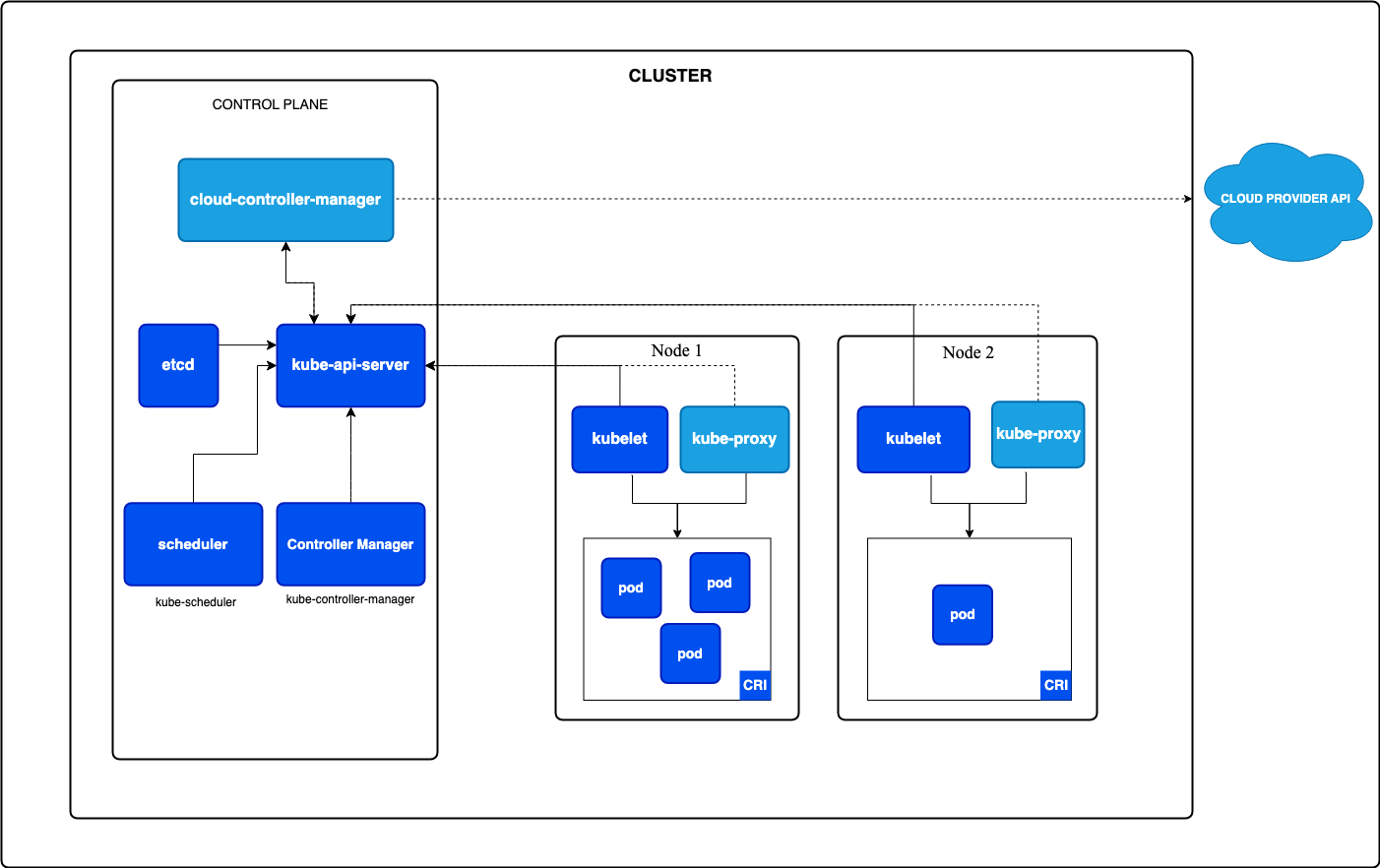
The main components of the Kubernetes cluster are responsible for keeping the system running in an organized, scalable way:
- API Server: The cluster’s communication hub — everything flows through it.
- etcd: The database that holds the cluster state.
- Scheduler: Decides which node each pod will run on, considering efficient use of resources.
- Controller Manager: Watches the lifecycle of resources, ensuring service replication and continuity.
Below you’ll find an architecture view to help you understand how it works visually.
Cluster configuration and management
To get a cluster up and running, you need to install Kubernetes on the main node and on the worker nodes. The initial cluster configuration is done with the kubeadm init command on the main node, which generates a command the other nodes use to join the cluster. On top of that, the Kubernetes project ships a graphical interface that, once deployed, makes it easier to create and manage applications. Just run kubectl proxy to access it and see all the cluster details.
Managing multiple Kubernetes Clusters
When the environment is more complex — like in large development teams — you may need to manage multiple clusters at the same time. This lets different clusters be configured for specific purposes, like development, testing, and production, either on-premises or in the cloud. Unified cluster management lets operations like updates, security configurations, and monitoring be performed centrally, ideal for environments with large-scale data and services.
Conclusion
The Kubernetes Cluster is the foundation that makes it possible to scale and manage containers in an automated way, efficiently and with high availability. Understanding its main concepts and components lets you get the most out of Kubernetes, optimizing your application’s infrastructure and resources.
Here at CloudScript, we help companies dive head-first into the Kubernetes world. So, if you want to explore Kubernetes’s potential in your business, we’re ready to help! Shall we?
See you next time!
 Viviane Coutinho
 Viviane Coutinho