Speed up your QA team and improve delivery quality
Hey everyone, how’s it going? In the world of agile methodologies and DevOps, chasing shorter delivery cycles with higher quality is a constant priority. That’s why today we’re going to explore how setting up a pipeline with dynamic previews on GitLab can be a real strategic advantage.
With this practice, you can functionally validate a feature end-to-end before it even gets merged into production or staging branches. That not only boosts QA team efficiency, it also strengthens collaboration across teams and significantly reduces the risk of critical failures.
In this post, we’ll show how this approach transforms workflows and share market metrics that back up its benefits. Ready to optimize your processes even more? Let’s go!
What are branch-based dynamic previews?
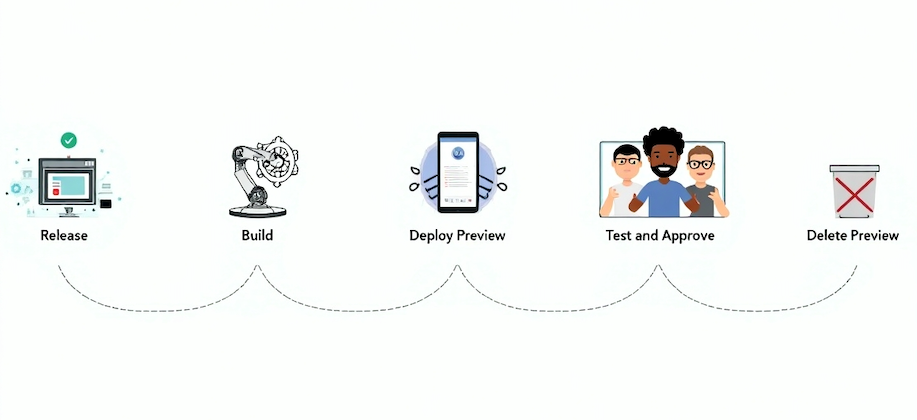
Dynamic previews are temporary environments generated automatically for each development branch, whether it’s a feature branch or a fix branch. That means, even before merging into the main branch or into staging and production environments, QA and stakeholders can validate changes in an isolated, realistic environment.
This practice lets developers, QAs, and product leaders interact with a version of the application exactly as it will ship to the end user, avoiding “surprises” during the final deploy.
Why implement a pipeline with dynamic previews?
- Fewer defects in production
Temporary environments based on branches significantly reduce the odds of bugs slipping into production. According to a DORA (DevOps Research and Assessment) report, high-performing teams have 3× fewer critical incidents when they adopt continuous validation practices ahead of final integrations. - Faster and more complete feedback
Auto-generated previews enable real-time feedback. According to the State of DevOps 2023 study, companies with robust pipelines can cut change validation time by up to 30% compared to companies that do late, manual reviews. - Better collaboration across teams
Dynamic previews make the validation process more accessible to every stakeholder, including QA, Product, and UX teams. That drives a continuous feedback loop and avoids scenarios where features get approved “blind”. An Atlassian report shows that teams working collaboratively with modern CI/CD tools see a 20% increase in overall productivity. - Less rework
The earlier a bug is found, the cheaper it is to fix. According to the IBM Systems Science Institute, the cost of fixing a defect found in early phases is up to 6× lower than in production. - Higher delivery speed
With dynamic-preview automation, the need to configure environments manually goes away. That helps new builds and releases get tested and approved faster, reducing delivery lead time by up to 25%, according to the Accelerate 2023 report.
Implementing on GitLab: an executive view
GitLab CI/CD lets you configure pipelines that automatically build, test, and deploy temporary preview environments for every branch. These environments can be accessed through dedicated URLs, making the validation process simple and accessible for the entire team.
Key executive benefits:
Lower operational costs: fewer critical production incidents and less time spent on rework.
Data-driven decisions: more frequent, automated validations enable clear insights into software quality at different phases.
QA team scalability: automated environments let the QA team focus more on exploratory and strategic testing, offloading repetitive checks to the pipeline.
Final thoughts
Implementing dynamic previews with GitLab isn’t just a technical improvement — it’s a strategic transformation that optimizes the development lifecycle and ensures higher-quality deliveries with less risk. For technology leaders, this practice translates into better predictability, stronger cross-team collaboration, and above all, faster, safer delivery to market.
Companies that invest in automated pipelines and smart QA flows earn a competitive advantage, enabling continuous innovation with confidence.
If you want your team to deliver more value with less risk, investing in dynamic preview pipelines with GitLab is a fundamental step.
Demo
Want to see our solutions in practice? Get in touch and watch a full walkthrough of a real case implemented by the CloudScript team. Find out how we can meet your company’s specific needs and boost your results.
See you next time!
References:
- DORA (DevOps Research and Assessment): Report on the capabilities that drive performance in software delivery and operations.
- State of DevOps 2023 — Google Cloud: Insights on DevOps practices and their impact on organizational performance.
- Atlassian Collaboration Solutions for 2025: A look at Atlassian tools that increase team productivity and innovation capacity.
- The Price We Pay for Faults — GSA: Discussion on the cost of fixing defects at different stages of the product lifecycle, referencing the IBM Systems Science Institute study.
- Improving Time-to-Market: How Engineering Leaders Can Optimize Delivery Pipelines: Article on how engineering leaders can optimize delivery pipelines to accelerate time-to-market.
- Verify — GitLab: Overview of how GitLab helps maintain strict quality standards for production code through automated tests and reports.